




RAM explained simply: how much, which type, and do you need DDR5?

After the processor, it is the second line on every spec sheet: “16 GB of RAM”. But what does that memory actually do? Why is 8 GB enough for some people and not for others? DDR4, DDR5, MHz, CL16… here is the whole story in plain language, with real figures — and exactly what to choose for your use.
What exactly is RAM? The workbench and the cupboard
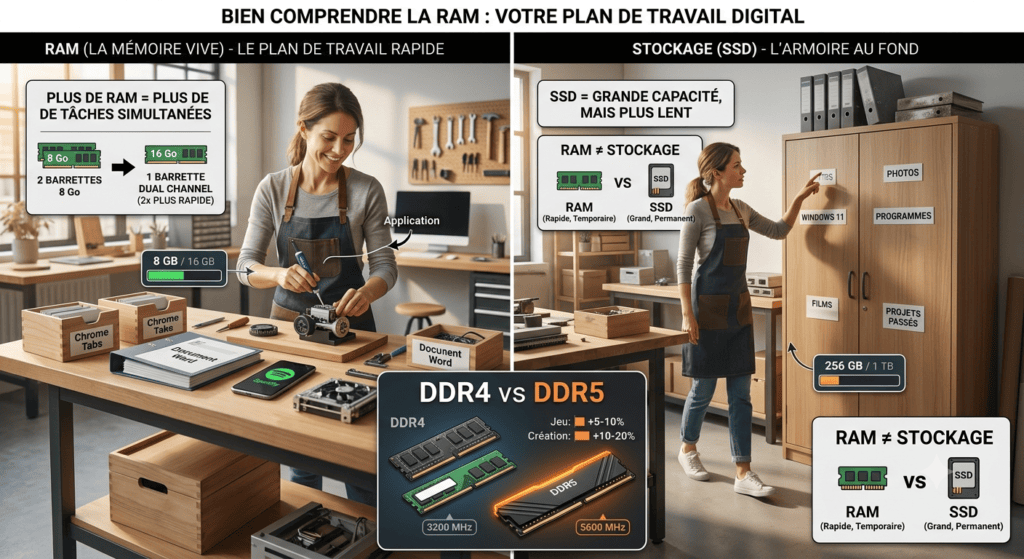
Imagine your computer is a craftsman in a workshop. The processor (CPU)is the craftsman himself: he does the work. The drive (SSD)is the cupboard at the back of the workshop: everything is stored there — your photos, your programs, Windows — but fetching something from the cupboard takes time.
The RAM is the workbench in front of the craftsman. Before starting a job, he takes the tools and parts he needs out of the cupboard and lays them on his workbench, within arm's reach. There everything is fast: he picks something up, uses it, puts it back down.
Two direct consequences:
- The bigger the workbench (more GB of RAM), the more jobs the craftsman can run at the same time without having to put everything away and take it out again: 30 Chrome tabs, Word, Teams, Spotify and a game — everything stays “laid out” and instantly available.
- When the workbench is full, the computer starts going back and forth to the cupboard (the SSD) to free up space. That is when everything crawls: the PC “thinks”, windows freeze, the fan goes wild.
RAM ≠ storage: the most common mistake
“My phone has 256 GB of memory” — no, it has 256 GB of storage and probably 8 GB of RAM. Both are measured in GB, hence the confusion, but they do completely different jobs:
| RAM (working memory) | SSD / storage | |
|---|---|---|
| Role | What is currently in use | What is stored (files, programs) |
| Speed | Extremely fast | Fast, but 10 to 50× slower than RAM |
| When you switch off | Everything is erased | Everything is kept |
| Typical amount | 8 to 64 GB | 256 GB to 2 TB |
Reading a RAM spec sheet: the 4 criteria that count
On a RAM module you will see something like “ DDR5 16 GB 5600 MHz CL36 ”. Let's decode each element, from the most important to the most anecdotal.
1. The type (DDR4, DDR5): the one non-negotiable criterion
DDR stands for Double Data Rate, and the number indicates the generation. Each generation is physically incompatible with the others: a DDR5 module does not fit a DDR4 slot — the notch is not in the same place, precisely to stop you forcing it. Your motherboard (and your processor) decides: if your machine takes DDR4, you buy DDR4, full stop. This is not a performance choice, it is a compatibility issue.
2. The capacity (the GB): the criterion you feel every day
This is the size of the workbench. By far the thing that changes your day-to-day experience the most:
- 8 GB — the bare minimum in 2026. Light office work, reasonable browsing. It works, but Windows 11 alone already uses 4 to 5 GB: the margin is thin.
- 16 GB — real comfort for 90 % of people. Smooth multitasking, dozens of tabs, video call + Excel + music at the same time, everyday gaming. Our default recommendation.
- 32 GB — for demanding gaming, photo/video editing, virtual machines, or simply to be covered for 5 years. The sweet spot for new gaming PCs.
- 64 GB and above — 4K/8K video editing, 3D, heavy development. Pointless for ordinary use: empty RAM speeds up nothing.
3. The frequency (the MHz): the speed of circulation
If the GB are the size of the workbench, the MHz are the speed at which the craftsman picks things up from it. DDR4 typically runs between 2400 and 3600 MHz, DDR5 between 4800 and 6400 MHz and beyond. The higher it is, the faster data travels between the RAM and the processor.
But let's be honest: between two similar frequencies, the difference is invisible in daily use. Going from 3200 to 3600 MHz only shows up in benchmarks. Going from 8 to 16 GB, on the other hand, shows up within the first hour.
4. The latency (CL): the reaction time
The “CL” (CAS Latency — CL16, CL30, CL36…) measures the memory's reaction time: the number of cycles it takes to answer when the processor asks it for data. The lower the number, the faster it reacts.
A subtlety: latency is counted in cycles, and DDR5 has much shorter cycles than DDR4. That is why DDR5 CL36 is not “slower” than DDR4 CL16: in real time (nanoseconds) they are roughly equivalent. Just remember: at equal frequency, a lower CL is better — but it is the last item on the list, the one that separates two otherwise identical kits. Never pay a premium for a few CL points.
Bonus: dual channel, the free trick
Two 8 GB modules are faster than a single 16 GB module. Why? With two modules the processor reads from both in parallel — like a craftsman working with both hands. That is dual channel, and in games it can mean 15 to 25 % more smoothness, for free. That is why our configurations always use kits of 2 identical modules.
DDR4 vs DDR5: what really changes (real figures)
On paper, DDR5 crushes DDR4: almost double the frequency, far higher bandwidth, better energy efficiency, built-in error correction. But in real life?
| Use | Real gain from DDR5 |
|---|---|
| Office work, web, streaming | No noticeable gain |
| Gaming at 1080p | Around 3 to 10 % more FPS depending on the title, especially recent and demanding games |
| Gaming at 1440p / 4K | 1 to 3 % — the graphics card is the limit here, not the RAM |
| Video editing, 3D rendering, creative work | 5 to 20 % time saved — this is where DDR5 really shines |
The honest conclusion: never change machine “just to move to DDR5”. A good DDR4 PC with 16 or 32 GB is still excellent in 2026 for gaming and everyday use. On the other hand, if you are buying or having a newmachine built, DDR5 is the natural choice: the new platforms (AMD AM5, recent Intel) only work with it, and you are investing in a base that will last for years.
Desktop, laptop, graphics card, smartphone: is it the same RAM?
Desktop vs laptop: same technology, different format
Good news: it is exactly the same technology. A desktop PC uses DIMM modules (long, ~13 cm), a laptop uses SO-DIMM (Small Outline, ~7 cm) — a compact version of the same memory. A laptop DDR4 SO-DIMM performs exactly like a tower DDR4 DIMM. They are simply not physically interchangeable: each has its own slot format.
One warning though: on some very thin laptops the RAM is soldered to the motherboard and cannot be replaced. That is exactly why we favour the business ranges (HP EliteBook, Lenovo ThinkPad) — designed to be opened, repaired and upgraded. More on that below.
Graphics card memory (VRAM): a specialised cousin
When you read “RTX 5060 Ti 16 GB”, those 16 GB are not ordinary RAM: it is GDDR (currently GDDR6 and GDDR7), memory designed specifically for graphics cards. The difference? Ordinary RAM is optimised to react fast to thousands of small, varied requests; GDDR is optimised to move enormous volumes of data at once — a game's textures, for example. One is a bike courier, ultra responsive; the other a lorry, less agile but carrying everything in one trip.
This VRAM is soldered directly onto the graphics card: it cannot be increased. The two memories add up on the spec sheet, by the way: a gaming PC with 32 GB of RAM and a 16 GB card really does have two separate memories, each with its own job.
And in your smartphone?
Your phone uses LPDDR (Low Power DDR — currently LPDDR5 and LPDDR5X): the same family of technology, but optimised to the extreme to use as little energy as possible and preserve the battery. It is soldered — often stacked directly on the processor to save space — and therefore never upgradable. That is why a phone's amount of RAM is chosen at purchase, once and for all: 8 GB is comfortable in 2026, 12 GB and more for high-end models.
How much RAM should you choose in 2026? Our simple guide
| Your profile | Recommended RAM | Why |
|---|---|---|
| Office work, email, light browsing | 8 GB (16 if the budget allows) | Enough, but 16 GB gives you real peace of mind |
| Home working, studying, multitasking | 16 GB | The comfortable standard: video call + spreadsheet + browser without slowing down |
| Gaming | 16 to 32 GB | 16 GB runs everything; 32 GB for big recent titles and streaming |
| Photo/video creation, virtualisation | 32 to 64 GB | Creative software devours memory — here every GB counts |
And at TechElite? Machines built to evolve
This is one of the great advantages of our catalogue, and it follows directly from everything above:
- Our refurbished laptops are business ranges from HP EliteBook and Lenovo ThinkPad, chosen precisely because their RAM is accessible and replaceable — not soldered as on many consumer ultrabooks. Every model in our shop can have its RAM upgraded, provided the memory is not soldered to the motherboard. Buying with 16 GB today? You will be able to move to 32 or 64 GB later, when the need arises — the machine grows with you.
- Our custom-built PCs are assembled with DDR5, always as a kit of two identical modules to take advantage of dual channel, with motherboards that keep slots free for future upgrades.
- Not sure how much you need? Just tell us what you use your computer for — we will advise the right configuration, without overselling you GB you will never use.
And like all our hardware, the installed RAM is covered by our 24-month warranty — refurbished included.
Need personal advice on RAM?
Unsure how much memory you need, or thinking of upgrading your current machine? Let's talk — quick answer, honest advice, zero jargon.
Contact us or discover our refurbished laptops with a 24-month warranty and our custom-built PCs.